


There is a special kind of boredom that hits somewhere around the third hour of copying data from one tab and pasting it into a spreadsheet. Not the tired kind, the soul-crushing kind. Where you are physically present, hands moving, screen glowing, but your brain left the building long ago. You are not working. You are functioning. Like a very expensive, very underpaid keyboard macro.
Here is the thing nobody at your job is going to tell you: that task does not need a human. It never did. The only reason it keeps landing on your desk is because nobody stopped to ask a better question than “who is going to do this?” That question is the trap. AI agents are how you stop answering it.
This guide walks you through building your own AI agent using Zapier Central no code, no developer, no technical background required. You set it up once, describe the outcome you want, and it handles the repetitive layer of your work while you operate at the level that actually needs your judgment. That is not a shortcut. That is how smart people are quietly redesigning the way they work right now.
Quick Look: Key Takeaways for the Future “Orchestrator”
- From Apps to Agents: Moving from “click-heavy” software to autonomous agents that think for you.
- The Zapier Central Brain: Using AI to bridge the gap between 6,000+ different apps.
- Research Power: Integrating Perplexity and Consensus into your automation to ensure your “AI Employee” has real-world data.
- Zero-Coding Required: Building custom logic without writing a single line of Python.
The Death of the “Manual Workflow”
If your job involves moving data from a PDF to a spreadsheet, or from an email to a CRM, you are essentially doing “human-bridge” work. In 2024, this was considered a job. In 2026, it’s considered a failure of the system. You got to be smarter than that!
The biggest shift in the “EverOak” philosophy is the move from Active Productivity to Passive Productivity.
- Active Productivity: You use a tool (like ChatGPT) to help you do a task.
- Passive Productivity: You build an AI Agent that does the task for you while you’re at lunch or focused on a creative project.
“Before you build your agents, you need to know which apps they should connect to. Check out our [Best AI Tools for Productivity 2026: The Ultimate Stack] to see the foundation of a high-performance system.”

once and let it run forever
Zapier Central: The “Brain” of Your 24/7 Employee
Until recently, automation was “dumb.” It followed a strict “If This, Then That” (IFTTT) logic. If a client emailed you, the system could move it to the folder, but I couldn’t understand what the client wanted.
Zapier Central has changed that by adding a reasoning layer to automation.
- The “Agent” Concept: You can now train a Central Agent on your specific company data. You can tell it: “Whenever a new lead comes in from our website, use Perplexity to find their company’s latest news, summarize it, and then draft a personalized outreach email in my Gmail.”
- The Goal: You aren’t just moving data; you are delegating Decisions.
- Secondary Keyword: automate daily tasks with AI
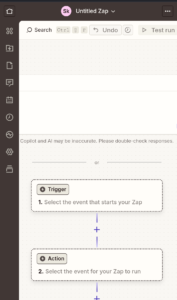
MindStudio: Building Your Specialized “AI Staff”
While Zapier Central connects your apps, MindStudio is where you build the “Specialists.” Think of this as hiring an intern who never sleeps and has an IQ of 150. Seems extraordinary right?
- The Custom “Mini-App”: You can build a “Content Editor Agent” that has read every blog post you’ve ever written. When you give it a draft, it doesn’t just fix grammar, it ensures the tone is 100% “EverOak Tales.”
- Data Integration: You can feed these agents your internal spreadsheets and private PDFs. Using Consensus, the agent can even verify if your internal marketing claims match the latest peer-reviewed industry trends.
- Technical Tip: This is known as RAG (Retrieval-Augmented Generation). It keeps your AI grounded in reality and prevents the “Hallucination Trap” we discussed in previous guides.
The Research Engine: Powering Your Agents with Truth
An automation is only as good as the data it uses. If you build an AI agent to write your weekly industry report, but it’s using outdated information, the agent is useless.
This is why we integrate Research Agents directly into the workflow:
- Perplexity Integration: Use Perplexity to “scrape” the live web. Your agent can now monitor your competitors’ pricing or track a breaking news story in real-time.
- Consensus Verification: If your work involves medical, legal, or high-tech data, your agent can use Consensus to ensure every “fact” it generates is backed by a peer-reviewed study.
- SEO Keyword: no-code AI automation
The “Human-in-the-Loop” Safety Net
The rebellious part of being an “AI Orchestrator” isn’t letting the machines take over, it’s knowing when to step back in.
To maintain Academic and Professional Integrity, you must implement
“Verification Gates.”
- Step 1: AI gathers data and drafts the report.
- Step 2: AI sends the draft to a Slack channel for you to review.
- Step 3: You click “Approve” or “Edit.”
- Step 4: The AI completes the task (e.g., sending the email or publishing the post).
- Why this works: It keeps the work Human-centric while removing 90% of the manual labor.
“Automating your work doesn’t mean losing your voice. To ensure you stay on the right side of academic and professional standards, read our guide on [How to Use AI for School Without Cheating] for the ultimate ethics framework.”

Scaling Yourself: The “AI Force Multiplier”
In the old world, if you wanted to double your output, you had to work double the hours or hire a full-time assistant. In 2026, you simply “spin up” another agent.
By mastering no-code AI automation, you are becoming a manager of systems rather than a doer of tasks. This is the ultimate “Future-Proof” skill. Whether you are a student preparing for your first job or a professional looking to escape the burnout cycle, learning to “Orchestrate” is the only way to stay relevant in the age of the algorithm.
Frequently Asked Questions (FAQ)
Q: Do I need to know how to code to use Zapier Central?
A: No. If you can write an email, you can build an AI agent. It uses “Natural Language Programming,” which means you just describe what you want the agent to do in plain English.
Q: How much does it cost to run an “AI Employee”?
A: You can start for free on most platforms. As you scale, a “Pro” plan usually costs around $20/month which is significantly cheaper than a Virtual Assistant and 100x faster.
Q: Can these agents handle my sensitive client data?
A: Yes, provided you use enterprise-ready tools. Both Zapier and MindStudio have strict data privacy policies (SOC2 compliance) that ensure your data isn’t used to train public AI models.
Conclusion
Most people will read all of this, feel fired up for twenty minutes, and go right back to copy-pasting on Monday morning. Not because they disagree but because starting always feels heavier than continuing, even when continuing is slowly draining them. That gap between knowing and doing is exactly where years disappear.
Do not let that be you. The people pulling ahead right now are not more talented or more technical. They just made one decision earlier to stop being the person who does the repetitive work and become the person who owns the system that handles it. One workflow built today saves you that same chunk of time every single day going forward. That is not a small thing. That compounds fast.
So close this tab and go build the first one. Set up your agent, watch it run without you, and pay attention to how that feels. That is the moment the mindset shifts for good from someone surviving the system to someone who built a better one. Check out our other guides on the best AI productivity tools to keep stacking that advantage. Now go you got it champ.